
Preparing a bundle of documents for a hearing comes down to eight steps done in the right order. This guide walks through each one for a hearing in the High Court of Singapore.
It is written for disputes lawyers, paralegals and practice support staff, and assumes the use of ordinary PDF software that can combine files, add bookmarks and add page numbers. This guide is written according to the Supreme Court Practice Directions 2021 and the Rules of Court 2021.
What is a bundle of documents for a hearing?
A bundle of documents is a paginated and indexed set of documents that counsel relies on at a hearing. This bundle is prepared so that the Judge or Registrar hearing the matter, as well as opposing counsel, can find and follow the documents you refer to.
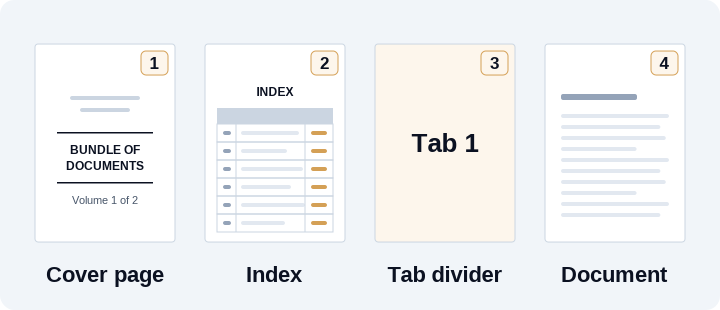
Step 1: Label your documents
Give every document a clear and consistent file name before you do anything else. Some good practices when labelling your documents include:
- Labelling your files in the order in which they will appear in your bundle.
- Using file names that can be used as bookmark labels and the description in your index.1 Most PDF software creates bookmarks from file names when it merges files.
Arrange your documents chronologically or in another logical order, for example pleadings, then applications, then affidavits.2
Some examples of file name formats include:
- Tab 1 - Statement of Claim (Amendment No. 3)
- Tab 2 - Defence of the 2nd Defendant (Amendment No. 2)
- Tab 3 - Summons HC-SUM 2871-2026 (Variation of freezing order)
Or, with numbers only:
- 01. Statement of Claim (Amendment No. 3)
- 02. Defence of the 2nd Defendant (Amendment No. 2)
- 03. Summons HC-SUM 2871-2026 (Variation of freezing order)
Step 2: Decide which documents go into which volume
Set a page limit for each volume, count the pages in every document, and allocate documents to volumes before you merge anything.
Set a maximum number of pages per volume
Many practitioners keep each volume to about 500 pages as a matter of practice. Hard copies of bundles often have to be printed for the Court,3 and it is difficult to bind a volume of documents that is more than 500 pages.
Count the pages and allocate
List the documents in a spreadsheet in the order they will appear, with one row for each document and a column for its page count. Then work down the list, keep a running total and group documents into volumes based on the page limit that you have set.
Some good practices when allocating documents to their volumes:
- Try to avoid splitting individual documents across volumes as far as possible. This is to avoid having to refer to separate volumes when referring to a single document.
- Keep in mind that a few extra pages will be needed for the cover page, index pages and divider pages.
The example below uses a 500-page limit. The first six documents fit into Volume 1. Adding the seventh would take Volume 1 past the limit, so it starts Volume 2.
| Tab | Document | Pages | Running total | Volume |
|---|---|---|---|---|
| 1 | Statement of Claim (Amendment No. 3) | 38 | 38 | 1 |
| 2 | Defence of the 2nd Defendant (Amendment No. 2) | 24 | 62 | 1 |
| 3 | Summons HC/SUM 2871/2026 (Variation of freezing order) | 3 | 65 | 1 |
| 4 | Summons HC/SUM 3010/2026 (Interim sale of Halyard Star) | 3 | 68 | 1 |
| 5 | 1st Affidavit of Rupert James Ashcombe | 180 | 248 | 1 |
| 6 | 1st Affidavit of Leonard Ong Chee Keong (Disclosure of Assets) | 112 | 360 | 1 |
| 7 | 5th Affidavit of Cheryl Tan Siew Ling | 150 | 150 | 2 |
Volume 1 holds 360 pages of documents and Volume 2 holds 150. The tab dividers, cover pages and indexes are added in the steps that follow.
Step 3: Prepare the cover pages and indexes
Draft the cover page and index for each volume.
- Each volume needs its own cover page and index of documents in that volume.4
- Volume 1 should contain a master index of every document in the whole set.5 The master index also serves as the index for Volume 1.
A cover page usually states the case number and title, the name of the bundle and the party submitting it, the hearing it is for, and the volume number, for example "Volume 1 of 2".
Each index should have the following headers: Serial Number or Tab, Date, Description and Page Range.6
A draft master index for the example is set out below.
| Tab | Date | Description | Page Range |
|---|---|---|---|
| Volume 1 | |||
| 1 | 14 May 2026 | Statement of Claim (Amendment No. 3) | |
| 2 | 28 May 2026 | Defence of the 2nd Defendant (Amendment No. 2) | |
| 3 | 22 June 2026 | Summons HC/SUM 2871/2026 (Variation of freezing order) | |
| 4 | 3 July 2026 | Summons HC/SUM 3010/2026 (Interim sale of Halyard Star) | |
| 5 | 2 March 2026 | 1st Affidavit of Rupert James Ashcombe | |
| 6 | 12 March 2026 | 1st Affidavit of Leonard Ong Chee Keong (Disclosure of Assets) | |
| Volume 2 | |||
| 7 | 20 July 2026 | 5th Affidavit of Cheryl Tan Siew Ling | |
Leave the page number column empty for now, but finish everything else. We will fill in the page numbers in the index later on.
Keep the cover pages and indexes as separate files. Do not merge them into the volumes yet.
Step 4: Compile the documents and insert tab dividers
Merge the documents for each volume into a single PDF, in index order, and then insert a tab divider before each document.
Merge the documents
Use the combine or merge function in your PDF software to create one PDF for each volume. Most PDF software has an option to add a bookmark for each file as it merges, using the file name as the bookmark name. Make sure you have this option selected.
After merging, open the bookmarks panel and check that there is one bookmark for each document.7
Insert the tab dividers
Insert a single divider page before each document, showing its tab number, for example "Tab 1".
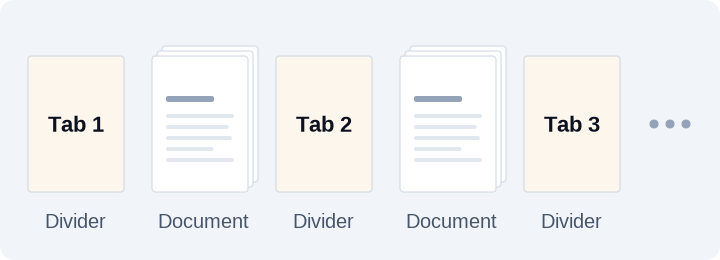
Use the bookmarks to navigate to each document in the bundles you have compiled and manually drag and drop the relevant divider page before the document.
Save an unpaginated copy
The next step will be to paginate the bundles. Before this, save a copy of each compiled volume without pagination. Page numbers stamped onto a PDF can be difficult to remove. You will need a clean version if errors are made or you wish to add or remove documents later on.
Step 5: Paginate your bundles
Use your PDF software to add page numbers to each compiled volume, starting from the page after your cover page and index.
The cover page and index are not in the volume yet, so the first page of the compiled PDF is not page 1. Start the numbering with an offset for the number of pages your cover page and index consist of.
For example, if the cover page and index take up 2 pages, start the pagination at page 3.
In the example:
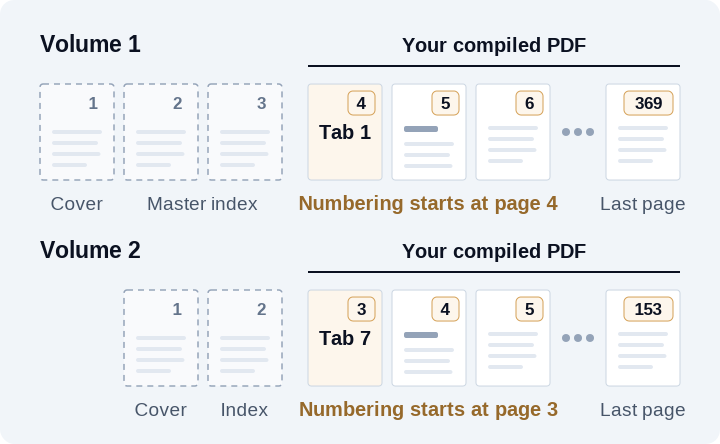
When you add the page numbers:
- Place the page number at the top right-hand corner of the page.8
- Number every page, including the tab dividers.9
- Restart the page numbering for each volume. Page 1 of every volume is its cover page.10
- Check that the numbers do not sit on top of text, particularly on landscape pages and scanned documents.
Step 6: Complete your indexes
Go through each paginated volume and fill in the page range for every document in the index.
Use the bookmarks to jump to each document, and read the number printed on its tab divider and on its last page. Enter the range in the index for that volume, and enter the volume and range in the master index.
The completed master index for the example is set out below.
| Tab | Date | Description | Page Range |
|---|---|---|---|
| Volume 1 | |||
| 1 | 14 May 2026 | Statement of Claim (Amendment No. 3) | 4 - 42 |
| 2 | 28 May 2026 | Defence of the 2nd Defendant (Amendment No. 2) | 43 - 67 |
| 3 | 22 June 2026 | Summons HC/SUM 2871/2026 (Variation of freezing order) | 68 - 71 |
| 4 | 3 July 2026 | Summons HC/SUM 3010/2026 (Interim sale of Halyard Star) | 72 - 75 |
| 5 | 2 March 2026 | 1st Affidavit of Rupert James Ashcombe | 76 - 256 |
| 6 | 12 March 2026 | 1st Affidavit of Leonard Ong Chee Keong (Disclosure of Assets) | 257 - 369 |
| Volume 2 | |||
| 7 | 20 July 2026 | 5th Affidavit of Cheryl Tan Siew Ling | 3 - 153 |
In this example, the first page of each page range is the tab divider. You may prefer to start the range from the first page of the document instead. Either works, as long as you apply the same approach to every document.
Step 7: Insert the cover pages and indexes
Insert and paginate the cover page and index
Use your PDF software to insert the cover page and index before the first page of each compiled volume.
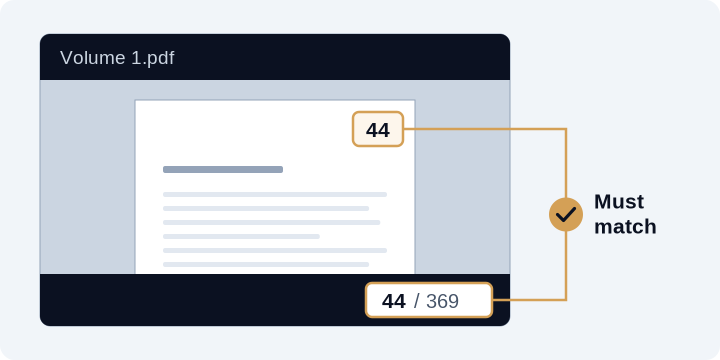
The cover page and index must also be paginated.11 You can either add the pagination for the cover page and indexes in Word or add them using your PDF software.
Check the page numbers
Open each volume and compare the page number printed on each page with the page number shown by your PDF software. The printed page numbers must match the page number shown by your PDF software.12
Step 8: Formatting and OCR
Check that every page is legible, that scanned pages are at no more than 300 DPI, and that each file is within the filing limits of 9,999 pages per document and 500 MB per transmission.13
It is also good practice to run Optical Character Recognition on your compiled bundles so that it is possible to make highlights and annotations on any scanned pages contained in the bundles.
Conclusion
Following these eight steps in order will give you a bundle of documents that is labelled, indexed and paginated for your hearing.
Download our checklist and use it to check your bundle before you file.
Frequently asked questions
When must a bundle of documents be filed for a hearing?
File and serve the bundle according to the timeline given by the Court or at least 1 clear day before the hearing.14 For a hearing in chambers that is not a special date hearing, the bundle may be submitted at the hearing itself,15 but this is not advisable as it does not allow parties sufficient time to review your documents.
Is a bundle of documents the same as a bundle of authorities?
No. A bundle of documents holds the factual documents relied on. A bundle of authorities holds the cases, legislation and other legal materials cited, and has its own requirements under the Supreme Court Practice Directions 2021.16
Is a hearing bundle the same as a trial bundle?
No. A trial bundle is subject to additional requirements under the Rules of Court 2021 and the Supreme Court Practice Directions 2021,17 which this guide does not cover.
Do these requirements apply in the State Courts?
The Rules of Court 2021 apply in the State Courts, but the State Courts Practice Directions 2021 govern preparation and filing there. Check those directions for a Magistrate's Court or District Court matter.
Preparing your next bundle
Standardise automates the entire workflow of building a Bundle of Documents in minutes, saving your team hours of manual work.
Book a demo to see Standardise in action.
This article is accurate as at 21 November 2026. It is general information for legal practitioners and is not legal advice. Check the current Rules of Court, Practice Directions and the directions in your matter before filing.
Footnotes
- Supreme Court Practice Directions 2021 (“SCPD”) 102(9)(b) read with SCPD 104(1). ↩︎
- Rules of Court 2021 (“ROC”) O 9 r 25(11) and SCPD 102(9)(c) read with SCPD 104(1). ↩︎
- See SCPD 45(1): the Registrar may request hard copies of documents filed electronically. ↩︎
- See SCPD 101(3)(b) and 101(3)(d)(ii): a cover page is required, and each volume has a table of contents of the items in that volume. ↩︎
- See SCPD 101(3)(d)(i): the table of contents of all volumes is placed at the beginning of Volume I. ↩︎
- Adapted from SCPD 102(9)(a) read with SCPD 104(1). ↩︎
- SCPD 102(9)(a) read with SCPD 104(1). ↩︎
- SCPD 38. ↩︎
- SCPD 38, which extends to separator sheets and exhibit sheets. ↩︎
- SCPD 38: each volume starts at page 1 and is numbered consecutively. ↩︎
- SCPD 38. ↩︎
- SCPD 38. ↩︎
- SCPD 102(11)(c)(iii) read with SCPD 104(1) (legibility); SCPD 41(3) (scan resolution); SCPD 41(1) (filing limits). ↩︎
- SCPD 101(1). ↩︎
- SCPD 104(1) and SCPD 105(1). ↩︎
- SCPD 101(5) to (11). ↩︎
- ROC O 9 r 25; SCPD 102. ↩︎